
Custom tmux visual bell
Terminal bells are a neat way for command-line applications to ping the user about something. It’s the ‘ding’ that you hear on your terminal sometimes when you’re tabbing around or when you run this.
printf '\a'
In tmux, you can enable visual bell via the bell-action and the visual-bell
option, but it is not super pretty, we can do better than that.

So I wrote this script that has tmux bark at you whenever any window under any
session gets a bell, using tmux’s display-popup, it also shows you the tmux
session and window that sent the bell.
To use it, you can just save this script somewhere, I use home-manager’s
home.file to write it for me. I used the path ~/.config/tmux/bell.sh
#!/bin/sh
SESSION="$1"
WINDOW="$2"
tmux display-popup -x P -y P -w 40 -h 3 -t . \
    "echo -n '🦴 awrf~ awrf~ $SESSION:$WINDOW 🦴'" &
(sleep 1 && tmux display-popup -C) &
then in your tmux’s config file,
set-option -g bell-action any
set-option -g visual-bell off
set-hook -g alert-bell "run-shell '~/.config/tmux/bell.sh \"#S\" \"#W\"'"
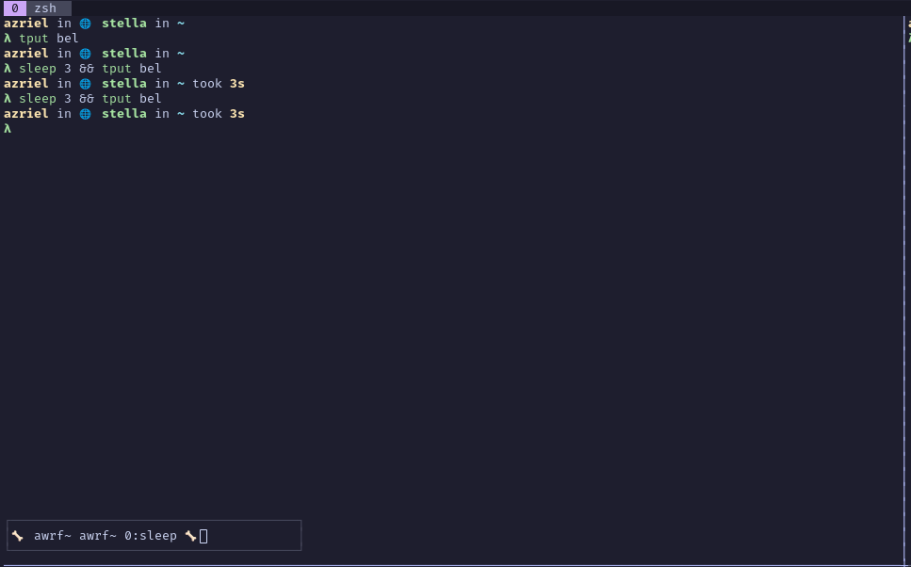
This is a pretty short blog, but I think it’s pretty neat and I hope you enjoyed it. At first I thought to make a tmux plugin but this also works.


